
Dungeon Lootr controls
The lobby buttons and the in-run bar, written from captured HUD rather than a fake key list.
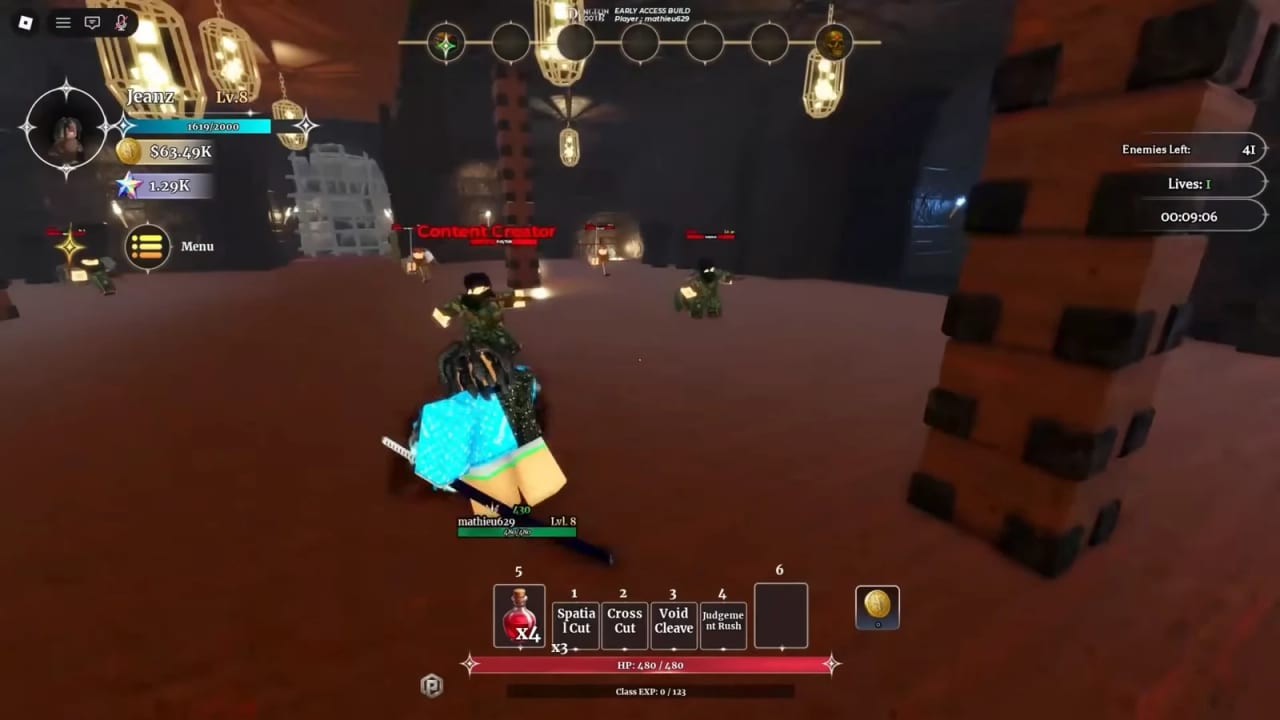
Players search “Dungeon Lootr controls” because the tutorial talks about skills and never prints a full bind card. This page is that card for PC and mobile. It is built from recorded HUD captures (the Bandit’s Den hero shot on this wiki, inventory, and the town plaza) plus the how to play loop. Where ClickBytes has not published a named key, this page says so instead of guessing Q/E/R from a different Roblox ARPG.
If you still have tutorial Ronin on the bar, finish Getting Started first. Binds do not save a D-tier kit. If you came here because SUBMIT will not open, you want how to redeem, not this table.
What the HUD actually shows
During a run the bottom bar is numbered. On the captured Bandit’s Den fight the slots read:
| Slot | Default contents (Ronin tutorial) |
|---|---|
| 1 | Ichimonji |
| 2 | Setting Horizon |
| 3 | Swallow Cut |
| 4 | Falling Blossom |
| 5 | Health potion (three charges in that capture) |
Other classes replace the entire 1–4 row. Infinity Core, Cursed Shrine, and Shadow Monarch’s Dagger do the same when equipped from town — see class items. Slot 5 staying a potion is why how to play tells you to drink, then walk to a cauldron.
The same capture shows Menu on the left, an enemies-left counter, a combo readout, HP, and class EXP. Those are not extra keybinds. They are always-on HUD.
PC (keyboard and mouse)
Dungeon Lootr is a Roblox experience, so movement and camera follow the client you already use:
- Move — WASD (or the arrows if you rebound Roblox).
- Camera — mouse look. Right-stick on a gamepad if Roblox has one connected.
- Jump — Space, unless you rebound it in Roblox settings.
- Basic attack — the left mouse button in every recorded session. The skill bar is separate from the auto-swing.
- Skills 1–4 — the numbered hotbar. Press the matching number, or click the icon. We have not seen a published Q/E/R overlay that overrides those numbers, so do not rebind from a Dungeon Hunters article.
- Potion — hotbar slot 5 in the default layout.
- Interact / chests / NPCs — the on-screen prompt when you stand on a chest, cauldron, Forge, Guide, or Codes panel. Roblox’s default interact is often E or a click on the prompt; if your client shows a different letter, trust the prompt.
- Parry — the combat system has a parry window (Bandit Chief and Varek punish mashing). ClickBytes has not printed “parry = F” in a public patch note. Open the in-game settings / Roblox keybinds if the tutorial flash did not stick, then practice on Bandit Chief before Goblin’s Stronghold.
Shift-sprint, emotes, and Roblox escape-menu are client chrome, not Dungeon Lootr-only binds. Do not chase a “secret dash key” on Discord screenshots.
Mobile
The plaza HUD on the overview screenshot is built for thumbs: Menu, Shop, Inventory, More sit as large buttons between runs. In a dungeon you get a left joystick, a right attack cluster, and the same 1–4 skill icons plus a potion.
- Move with the left stick. Camera is a right-side drag, same as other Roblox ARPGs.
- Tap a skill icon instead of pressing 1–4. The cooldown grey-out is the same as PC.
- Paste codes from the OS clipboard before you go fullscreen. The Codes box under Menu → More is a tiny field; typing FORGESKIP by hand is how people invent FORGE SKIP. Details on how to redeem.
- If the skill cluster covers a chest beam, rotate the camera rather than turning HUD scale into a science project mid-boss.
Mobile and PC share the same 15-player servers, the same spin odds, and the same extract rule. There is no mobile-only class table. There is also no published “mobile is easier” slider. Difficulty (Normal / Hard / Nightmare) is a dungeon setting, not a platform setting.
Lobby buttons that are not combat
From the town plaza capture:
- Menu (left) — the root. Codes live one layer deeper: Menu → More → Codes.
- Shop / BUY SHOP / SELL SHOP — Merchant and junk sale. Coins for the Forge, not a second skill bar.
- Inventory — Starter Compensation, keys, gems, class items. Filter All after every extract.
- More — Codes, extra lobby tools, the panel people skip when SUBMIT “does nothing.”
- Classes hall — Normal Spin and Lucky Spin. No combat bind, just a building on the plaza.
- Forge NPC — talk, then the FORGE menu. Upgrade is a UI button, not a hotkey.
Emotes and hangout are on the same plaza. They do not spend lives. They also do not bank Infernal Ore. Extract first.
Follow-developer freebies (not keybinds)
A 29 August 2026 codes roundup notes extra green check buttons on the redeem screen if you follow listed developers on Roblox. That is a social claim, not a combat control. Treat it as optional. The fourteen live strings on the codes hub still require the ClickBytes group join.
What this page will not invent
- A full QWERTY overlay copied from Dungeon Hunters or Dungeon Quest.
- A controller glyph sheet ClickBytes has not shipped.
- A “one-button auto-parry.” Scripts that promise that belong on the scripts hub, which is a warning page, not a bind list.
- Per-class unique keys. Classes change the icons on 1–4, not the numbers you press.
If a patch adds a printed controls card, it will land on the updates hub the same day we edit this table. Until then: numbers for skills, slot 5 for potions, Menu → More → Codes for promo strings, and parry as a timing skill you learn on Bandit Chief. Then go run dungeons instead of sitting in the plaza rebinding Space.
Frequently Asked Questions
Quick answers for codes, classes, Boss Rush, and forging.
What are the default Dungeon Lootr skill keys on PC?
The captured HUD uses hotbar numbers 1–4 for class skills and slot 5 for potions. Other kits replace the 1–4 icons, not the numbers.
How do I open the Codes panel?
In the multiplayer plaza: Menu (left) → More → Codes. Tutorial island does not have a working SUBMIT.
Is there a different control scheme on mobile?
Joystick plus tap icons instead of number keys. Same servers, same classes, same extract rule. Paste codes from the clipboard before fullscreen.
What key is parry?
ClickBytes has not published a named parry key in a public note. The window exists in combat. Check in-game / Roblox binds, then practice on Bandit Chief.